LATEST UPDATES
SYSTEM UPDATES
Zelist Monitor adds a new functionality to the monitoring platform: Tiktok TranscriptsZelist Monitor adds a new functionality to the monitoring platform: Tiktok Transcripts
24 Jun
2025
Bluesky Social added to monitoring2025
We have added the Bluesky Social platform to our monitoring system, under the Forums section.
14 May
2025
Zelist Monitor launches in a new feature "Top: Topics in the online press"2025
8 Jun
2022
Zelist Monitor adds a new source in monitoring social media2022
A new social media channel has been added to the list of sources we monitor
8 Mar
2021
Terms of Service Updates2021
We've just updated our Terms of Service
20 Mar
2020
Setting your alerts for each source2020
Now you can choose to set your alerts for each source
3 Mar
2020
Zelist Broadcast Media Monitoring is now available2020
Get Full Media Coverage by Monitoring Broadcast Mentions for the main TV & Radio Stations
27 Nov
2019
Users can report irrelevant mentions in Zelist Monitor2019
Every Zelist Monitor mention comes with the button "Mention report".
9 Feb
2016
Unique sources in Zelist Monitor2016
Zelist Monitor users can see the number of unique sources where an expression was mentioned
9 Feb
2016
Zelist Monitor introduces the option of 2 or 3 daily alerts2016
From now, Zelist Monitor users have the oportunity to receive on the e-mail 2 or 3 daily alerts, for a better monitoring of the expressions.
22 Jan
2016
Screenshots for online press articles2016
You can instantly acces screenshots of the online press articles you are interested in
24 Nov
2015
Zelist Monitor mentions the influencers from Instagram, Youtube and Facebook2015
How much was your brand mentioned on Instagram, Youtube and Facebook?
12 Nov
2015
Favourite articles can be sent via e-mail2015
All relevant articles, in one place
18 Jun
2015
Filtered results can be exported2015
Exact searches, in one place
12 Jun
2015
Multiple marking in the filtration of appereances2015
We have facilitated the filtration of appereances
26 May
2015
Customs lists, a new feature in Zelist Monitor2015
Because at Zelist Monitor we always try to make things easier and to offer you the most relevant information, we present you the newest feature of our platform: custom lists.
20 Apr
2015
The press, added in the "Influencers" sub-menu in Zelist Monitor2015
How much was your brand mentioned in the online press?
10 Nov
2014
The Zelist Monitor tagcloud, a brand's "radiography" in social media2014
The most important tags about a brand, all in one place
7 Nov
2014
Task management in ZeList Monitor2014
Now you can add tasks in our platform
30 Oct
2014
ZeList Monitor searchs in mentions2014
An upgrade for mentions' listing
29 Oct
2014
The ZeList Monitor newsletter has a subscribers system2014
Everybody can acces the newest social media news
29 Oct
2014
Zelist Monitor - now with ask.fm2014
Because we want to be aware of new social media channels, we added a new source.
16 May
2014
Instagram and Foursquare (first numbers for Romania)2014
We've added two new sources in Zelist Monitor
29 Nov
2013
Zelist Monitor - now with Facebook2013
Zelist Monitor monitors Romanian users' Facebook posts, in private beta version
26 Nov
2012
Zelist Monitor is introducing a new category of monitored sources: Content aggregators2012
At the request of many customers we've decided to add a new category of sources.
15 Oct
2012
Mentions on LinkedIn available in Zelist Monitor2012
Do you want to know what it is said about your brand on LinkedIn?
26 Sep
2012
We monitor blog comments added with Facebook social plugin2012
An upgrade for blog comments
4 Sep
2012
Group comparator and share of voice2012
We've added two new funcions in Zelist Monitor
4 Sep
2012
Comments through Comments Box, now available in the platform2012
881 comments were published daily, in the last 7 months, on the most important 50 online media publications from Romania
8 Aug
2012
ZeList Monitor data can be exported by days2012
We've added a new function for data export
8 Aug
2012
324.831 - Do you recognize the number?2012
More than 300.000 comments published on the most important 13 online media websites in Romania
26 Jul
2012
Zelist Monitor English version2012
Starting today, 11.07.2012, Zelist Monitor platform is available both in Romanian and in English.
11 Jul
2012
Expressions comparison & viewership2012
You can compare two expressions from their estimated viewership point of view.
20 Sep
2011
Displaying the number of unique sources2011
We show you the number of unique sources in which the mentions were made
16 Sep
2011
“Favorite” section2011
You can add any article you consider to be interesting or you want to save for your archive.
16 Sep
2011
Graphic impact2011
In the Graphics section you can see a new graphic that shows the impact of the mentions depending on the sources.
13 Apr
2011
We monitor Facebook!2011
Because a social media expert can't ignore the most important social network in the world
4 Apr
2011
Computing the impact2011
We go beyond the simple listing of mentions and we compute their impact depending on the importance of the source
3 Apr
2011
Demography and geography2011
Who and from where are those that write about the topics you monitor? You now have access to this data
2 Apr
2011
2011
26 May
2015
2015
Multiple marking in the filtration of appereances
At ZeList Monitor, we have the option to search in the mentions. This option helps the user to find the mentions which contain the desired expression, but alson another keyword or expression.
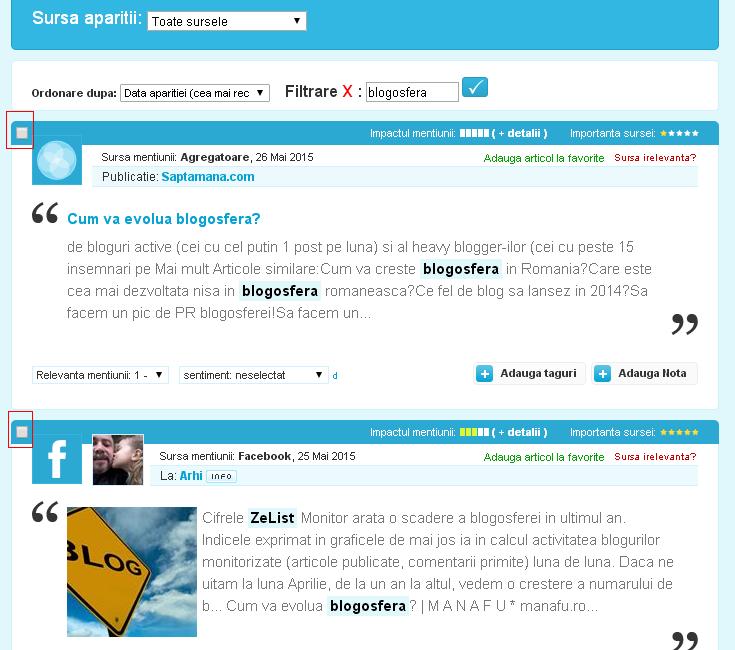
To ease the users work, we gave them the option to select more filtered mentions which have the same subject and to set the same tag, sentiment or relevance.
The filtered articles can be selected either from the checkbox from left, or from the menu which appears at the end of every filtration..
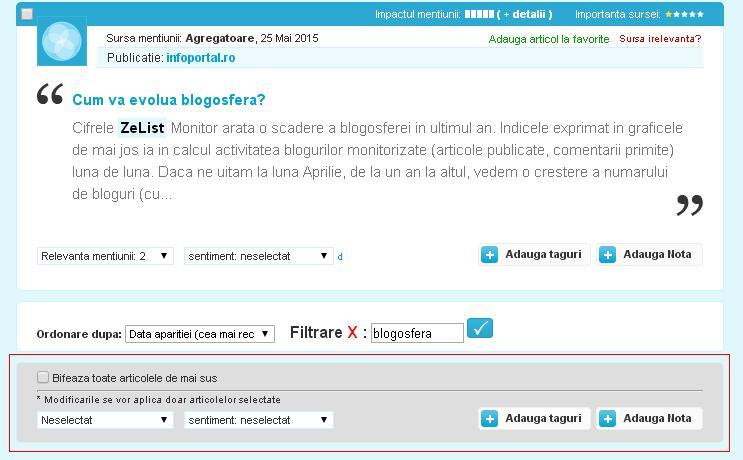
To ease the users work, we gave them the option to select more filtered mentions which have the same subject and to set the same tag, sentiment or relevance.
The filtered articles can be selected either from the checkbox from left, or from the menu which appears at the end of every filtration..